Home → Dashboards → Sales & Average Check
Achilles Analytics dashboard

Sales & Average Check: sales trends without Excel

Sales, revenue, average check and sales velocity per day — by period, rep and source. The AI agent warns you when the average check starts falling.

Refresh every 30 minutes · Comparison with last month and year

“Sales & Average Check” dashboard: revenue, average check, velocity

How it works

30-minute setup — then it runs itself

01
30-minute setup
Via the official API, no CRM rebuild. Time zone and fields are detected automatically; a specialist sets up the dashboards.
02
Refresh every 30 minutes
Fresh leads and calls in the dashboard every 30 minutes — no exports, no Excel.
03
The AI agent Achilles analyzes
Highlights anomalies and writes insights in words: alerts, warnings, wins.
04
You make decisions
10 minutes in the morning instead of three hours with spreadsheets on Friday.

Features

What the manager sees

Revenue and sales for the period
How much money and how many leads the period brought — versus last month and last year.
Average check
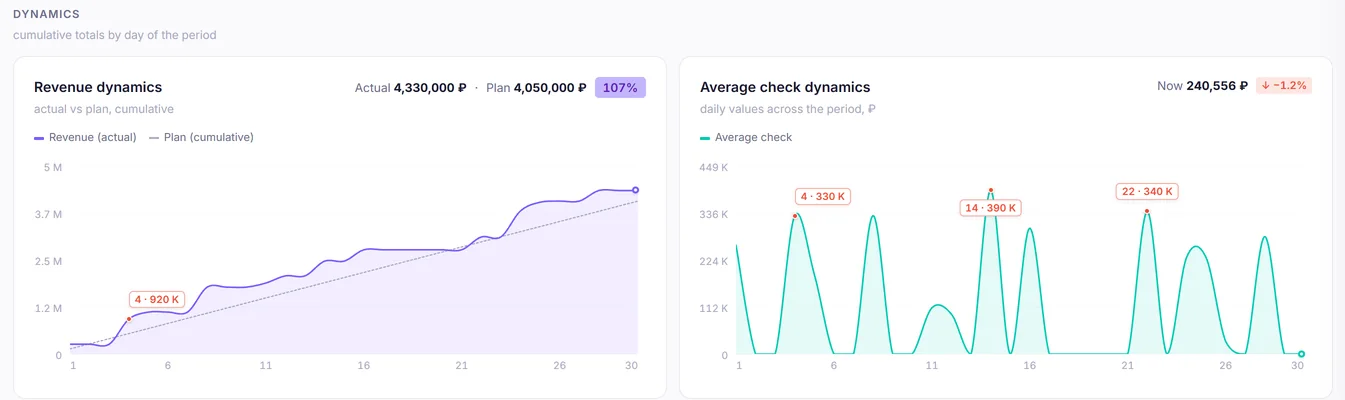
Average-check trend by period and rep. A falling average check is the first sign of unauthorized discounts.
Sales velocity
Money per day: a pace metric that shows whether you are on track for the monthly plan.
Cumulative trend
A revenue and average-check chart by day — you see the moment it went wrong.
Segments: new and returning
Revenue from new leads and returning contacts separately — you see what really holds up your cash flow.
AI warnings
“Average check fell 59.5%: 150,000 vs 370,000” — Achilles writes this itself, before you notice.


Interface

This is how it looks in Achilles

Money for the period: sales, revenue, average check and daily velocity
Revenue trend vs plan and average-check trend
Team: plan-fact, average check and sales cycle for each rep
1 / 3
Manager takeaway
“Average check fell 15% — check whether reps discount on their own”

FAQ

Frequently asked questions

Where does revenue come from — the lead budget?
Yes, from CRM lead budgets in won statuses. Which statuses count as won we agree during onboarding.
Can I view by business line?
Yes, filters by funnel: if business lines are split across CRM funnels, each is visible separately.
Are repeat sales counted?
Yes, the “new” and “returning” segments are counted separately based on the client’s contact history.

Try it on your data

7 days free — no card

30-minute setup. Request a demo — we will show Achilles on your numbers.

Get a demo on your data → Sign up yourself