HomeDashboards → Activity panel
Achilles Analytics dashboard

Team activity in CRM: who works and who just looks busy

Deal events, stage changes, new deals and an activity index of 0–100 for each rep by day. AI finds “stalled” deals no one has touched for weeks.

Activity index 0–100 · Events by day · Stalled deals

Activity dashboard: index 0–100, events, stalled deals

How it works

30-minute setup — then it runs itself

01
30-minute setup
Via the official API, no CRM rebuild. Time zone and fields are detected automatically; a specialist sets up the dashboards.
02
Refresh every 30 minutes
Fresh deals and calls in the dashboard every 30 minutes — no exports, no Excel.
03
The AI agent Achilles analyzes
Highlights anomalies and writes insights in words: alerts, warnings, wins.
04
You make decisions
10 minutes in the morning instead of three hours with spreadsheets on Friday.

Features

What the manager sees

Activity index 0–100
All of a rep’s events are weighted into a single index — you can compare people with one number.
Deal events
Stage changes, new deals, tasks and messages — what actually happened in the CRM over the period.
Stalled deals
“212 deals with no events for over 7 days” — money sitting idle, broken down by rep.
Trend by day
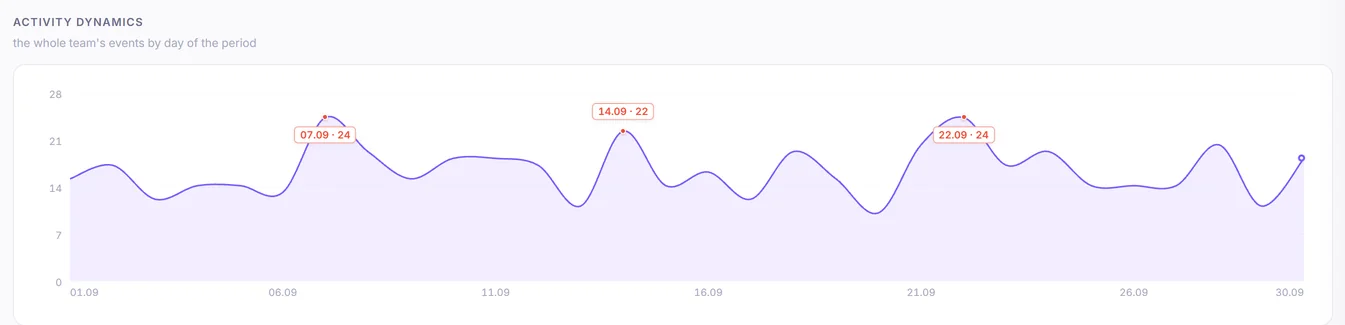
You see the days activity drops: Fridays, Mondays or a specific week for a specific person.
Wins are visible too
AI marks the best: “Dmitry — index 100, best on the team” — material for the standup.
An early burnout signal
Activity halving at the same plan is a reason to talk before a rep burns out or leaves.

Interface

This is how it looks in Achilles

Summary: activity index 0–100, events, stage changes, new deals
Daily activity trend: drops are visible at once
What made up each rep’s activity
Team table: index, events, stages and deals for each
Stalled deals by rep: AI flags “Attention”
1 / 5
Manager takeaway
“Clark’s activity halved in two weeks — talk before you lose the quarter”

FAQ

Frequently asked questions

Which events are counted?
Deal movements: stage changes, deal creation, tasks, messages and calls from the CRM.
Is this employee surveillance?
This is analysis of work with deals, not screen captures. You see which deals have no movement — something a manager should know anyway.
How is the activity index calculated?
Each event type has a weight (a stage change counts more than a task); the sum is normalized to the team’s best result for the period — a 0–100 scale.

Try it on your data

7 days free — no card

30-minute setup. Request a demo — we will show Achilles on your numbers.

Get a demo on your data → Sign up yourself